
To match Flipkart TCS with the GST portal, add up the TCS in your Flipkart report for the month — or take 0.5% of your net taxable sales (sales less returns) — and compare it with the TCS that Flipkart's GSTIN shows in the portal's TDS and TCS Credit Received for the same month. If the two agree within a rupee or so, you are matched. If not, look at returns near the month end, cashback notes and which state's GSTIN Flipkart reported under, then raise any real gap with Flipkart. A TCS difference does not change your GSTR-1.
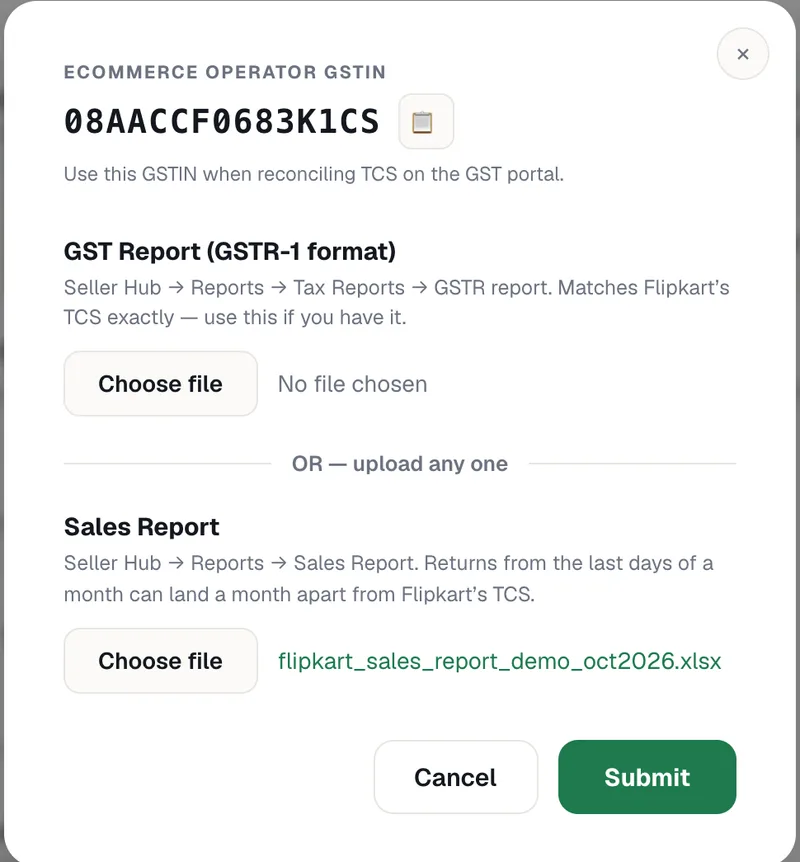
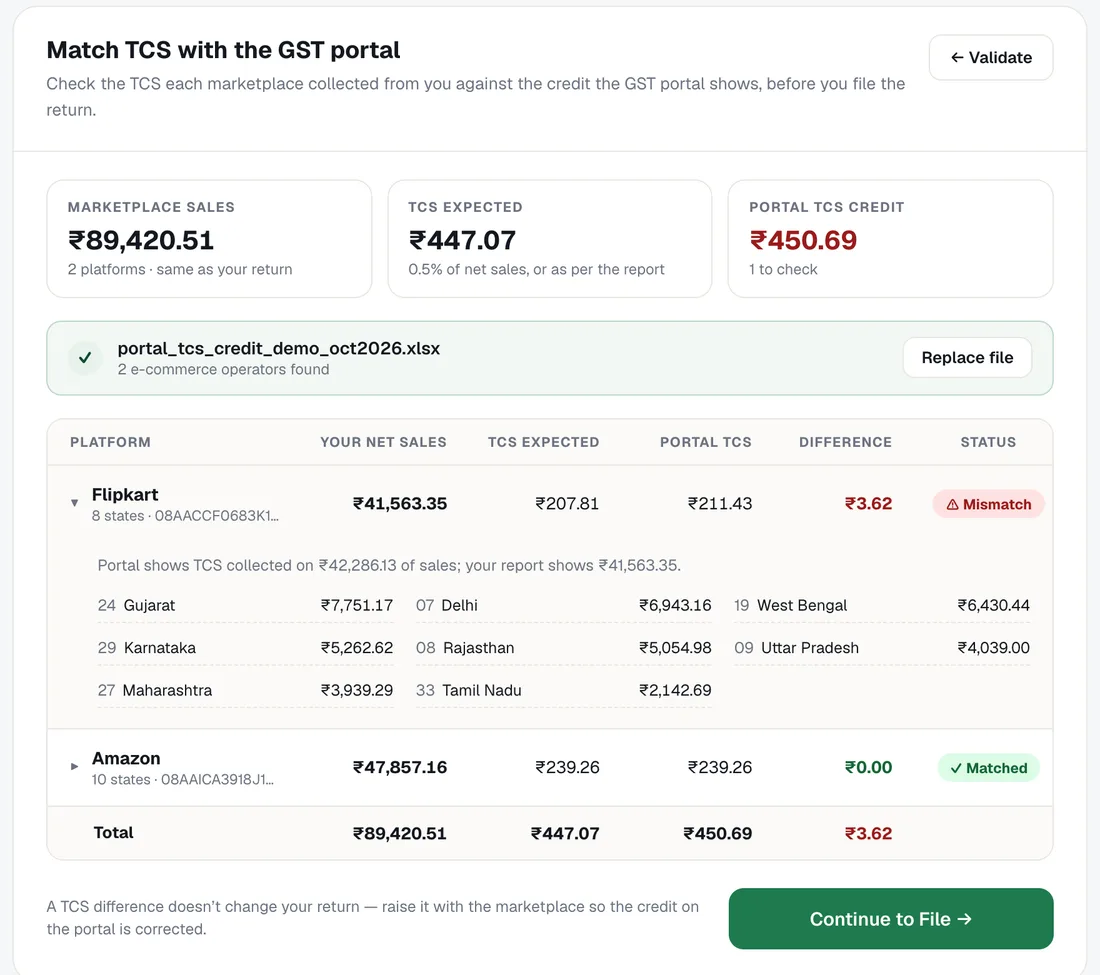
TaxGen does this match for you as a step before filing your GSTR-1 — upload your Flipkart report and the portal's TCS file, and each marketplace shows Matched or Mismatch with the difference. This guide explains what is being compared and why the numbers can differ.
What Flipkart TCS is
Flipkart is an e-commerce operator. Under Section 52 of the CGST Act it collects TCS (tax collected at source) from your payouts at 0.5% of your net taxable sales — 0.25% CGST and 0.25% SGST for sales within your state, or 0.5% IGST for sales to other states. The rate has been 0.5% since 10 July 2024; it was 1% before that.
Flipkart reports the TCS it collected against your GSTIN in its GSTR-8 return, filed by the 10th of the next month. It then shows on the GST portal as a credit to you.
Where to find each number
- Flipkart's side: Flipkart Seller Hub → Reports. The Sales Report has a Total TCS Deducted column on every sale and return. The GSTR report (Reports → Tax Reports) follows the same months Flipkart uses for its own TCS return.
- The portal's side: GST portal → Services → Returns → TDS and TCS Credit Received. Pick the month and download the Excel file. It lists each e-commerce operator's GSTIN with the net value it collected TCS on and the TCS amount.
Flipkart's TCS GSTIN starts with your state code and carries the PAN AACCF0683K — for example 08AACCF0683K1CS for a seller in Rajasthan. That is the row to look at on the portal, and the GSTIN that goes in Table 14 of your GSTR-1.
How to match Flipkart TCS with the GST portal, step by step
1. Take your net Flipkart sales for the month
From the Flipkart report, add sales and take off returns and cancellations, to get the net taxable value for the month you are filing.
2. Work out the TCS you expect
Add up the Total TCS Deducted column, or take 0.5% of the net taxable value. The two should be within a few paise of each other.
3. Download the portal's TCS credit
On the GST portal, go to Services → Returns → TDS and TCS Credit Received, choose the same month and download the Excel file. For a quarterly (QRMP) return, download all three months.
4. Compare Flipkart's row
Find Flipkart's GSTIN in the file and compare both numbers: the value Flipkart collected TCS on against your net sales, and the TCS amount against what you expected. In TaxGen, upload the file at the TCS Match step and the comparison is made for you, with the state-wise sales behind it.
5. Sort out any difference, then file
If the numbers match, file your return. If they don't, find the reason (below). A gap in Flipkart's figures is raised with Flipkart; it is not fixed by changing your GSTR-1, which should report your actual sales.
Why Flipkart TCS and the portal don't match
- Month-end returns: Flipkart's GSTR report moves some events from the last days of a month into the next month. A return dated the 29th or 30th can be in your Sales Report for this month but in Flipkart's TCS for the next. These differences usually reverse the following month.
- Cashback notes: Flipkart raises credit notes in your name for cashback offers, and debit notes when a cashback order comes back. They change your net sales, so make sure your figure includes them.
- More than one GSTIN: with stock in warehouses in other states, each of your GSTINs has its own Flipkart TCS. Compare the report rows for one GSTIN with that GSTIN's portal credit.
- Not filed yet: if Flipkart has not yet filed its GSTR-8 for the month, the credit will not show on the portal. Check again after the 10th.
- Cancelled orders: an order cancelled before it shipped is not a sale and carries no TCS.
- A real error: if none of these explain it, raise a ticket with Flipkart Seller Support with the month, your GSTIN and the two figures.
After the match: claiming the TCS credit
TCS that Flipkart deposits is your money. On the GST portal, accept it in the same TDS and TCS Credit Received section; accepted TCS is credited to your electronic cash ledger, where it can be used to pay GST or claimed as a refund.
Frequently asked questions
Q1. How much TCS does Flipkart deduct?
0.5% of your net taxable sales — sales less returns — since 10 July 2024: 0.25% CGST and 0.25% SGST within your state, or 0.5% IGST for other states. Before that the rate was 1%.
Q2. Where can I see Flipkart TCS on the GST portal?
GST portal → Services → Returns → TDS and TCS Credit Received. Choose the month and look for Flipkart's GSTIN, which carries the PAN AACCF0683K. You can download the list as Excel.
Q3. What is Flipkart's GSTIN for TCS?
Flipkart's TCS GSTIN for your state: your state code, then the PAN AACCF0683K, then 1C and a check character — for example 08AACCF0683K1CS in Rajasthan. The same GSTIN goes in Table 14 of your GSTR-1.
Q4. Why is my Flipkart TCS different from the portal?
Most often because of returns near the month end, which Flipkart can place in the next month, cashback credit and debit notes, a different state's GSTIN, or because Flipkart has not filed its GSTR-8 yet. Differences from month-end timing usually reverse the next month.
Q5. Does a TCS mismatch change my GSTR-1?
No. GSTR-1 reports your actual sales. If Flipkart's figure is wrong, raise it with Flipkart so the TCS credit on the portal is corrected.
Q6. When does Flipkart TCS show on the GST portal?
After Flipkart files its GSTR-8 for the month, which is due by the 10th of the next month.
Q7. Can TaxGen match my Flipkart TCS automatically?
Yes. Upload your Flipkart report and the portal's TDS and TCS Credit Received file, and TaxGen compares sales and TCS for each marketplace before you file your GSTR-1. It is part of the ₹99 GSTR-1 filing, with AutoFile included.
Ready to check? Open the GSTR-1 tool, upload your Flipkart report and match your TCS before you file.